Tuesday, July 1, 2014

Stay Close to the Goal to Score

Every four years the countries of the world come together in the competitive sport of soccer, known outside of the United States as "football" or "futbol."  The Fédération Internationale de Football Association's (FIFA) 20th World Cup series is held in Brazil this year, and started June 12.

World Cup PreGame in Miami

In the week preceding the start of the World Cup, several teams played pregames in Miami, Florida.  This was convenient for my family because we were vacationing that same week in Fort Lauderdale, Florida, about 20 miles from Miami.  We decided to attend the game featuring Korea vs. Ghana.   


Although I have watched soccer on television, this was my first live game.  In the continuum of competitive team sports, I think basketball is the fastest pace and highest scoring.  On the other end of the continuum is baseball which has a slow pace and is typically low scoring.  Soccer falls in the middle.  While it is extremely fast paced, many games end with scores of 0:1 or 1:2.

Ghana 4 - Korea 0

Unfortunately for the Korean team, the final score was little more lopsided.  The team from Ghana focused more on offense, and as a result, spent more time closer to their goal.  More time spent at the goal increases the likelihood of a score, and the Ghana team made four goals while Korea did not make any.  The final score:  Ghana, 4 - Korea, 0.

Life Goals

All of this got me thinking about goals in life.  Are you making offensive plays that continually move you closer to your goals, or are you far from where you need to be?

When I was in college, there was a fellow student from Nepal.  For me, at the time, that seemed like the most remote place on earth and about as far from Chattanooga, Tennessee, as one could get. 

The primary land feature in Nepal is Mt. Everest.  Let's say that I wanted to climb Mt. Everest.  From a practical standpoint that will never happen because I don't have $100,000 to pay for the opportunity to climb. 

If climbing Mt. Everest is my goal, what am I doing to work towards that?  What kinds I activities should I be involved in?  A lot of physical stamina training, losing weight, and building muscle for, what many climbers have described, the most intensive physical effort.  It's likely that sitting in the relaxed setting of Starbucks writing a blog post will not advance that goal.

Well, I actually don't have the goal of climbing Mt. Everest.  But I do have a goal of publishing a book, and writing a blog is moving in that direction. 

Living the Dream

For several years I lived in Nashville, Tennessee.  Nashville, known world-wide as the home of country music, draws people from all over the United States who aspire to a successful singing or songwriting career.  Nashville actually has a much more diverse music scene than just country music.  People come to Nashville to live their dreams, and while most don't make it the level they imagine, they put forth an effort while working as servers in restaurants.

Recently, I relocated to Hot Springs, Arkansas.  Hot Springs is a resort town with a variety of attractions including actual hot springs (the oldest US National Park), several lakes, and a horse racing track established in 1904.  There's something for everyone.

However, when I describe Hot Springs compared to Nashville, there's one big difference.  No one comes to Hot Springs to live out their dreams as they do in Nashville.

Stay Close to the Goal

If you want to achieve your goals, you need to position yourself mentally and possibly physically to be closer to what defines success.  Sometimes this will mean making significant, life-changing decisions.  Sometimes it will mean foregoing a few small extravagances in order to save up for the vacation of a life time.  Wherever you need to be, start thinking - and doing - now to get there.

Wednesday, May 28, 2014

Tuesday, May 27, 2014

Repost - 10 Writers Who Use Old Technology


In a couple of previous posts, I wrote about the need to consolidate different calendars into one and how I use blank journals to create a planner.

Recently I came across a slideshow of ten famous writers who use older technology, ranging from pen and paper to typewriters, to craft their books.


Another author not featured in the slideshow above is Vladimir Nabokov, most well-known for writing the novel Lolita, about a man madly in love with a 12-year old girl.  Nabokov wrote scenes and dialogue on 4x6 index cards.  He would reorganize these cards to create his novels.


Regardless of how you write, the most important thing to remember is to write. 

Thursday, May 22, 2014

Communications training from an FBI investigator

Today I attended a live webinar delivered by Mark Goulston, a psychiatrist, former FBI negotiator, and author of Just Listen.  The essence of the webinar and his book is that we don't really listen to others.  Especially in this era of multitasking and smart phones, we may or may not actually even comprehend what someone is saying to us.

People are like computer modems

In the webinar Dr. Goulston used the example of the modem, which used to be the piece of computer hardware that connect a computer to the Internet or some other network of computers.  The memory capacity of modems would eventually fill to capacity, at which point the modem needed to be disconnected to dump the memory.  Dr. Goulston's analogy was that we typically focus on ourselves to the exclusion of others.

Dale Carnegie, author of How to Win Friends and Influence People recognized this over 100 years ago when he recommended that we "become genuinely interested in other people" and "encourage others to talk about themselves."

Mirror neurons

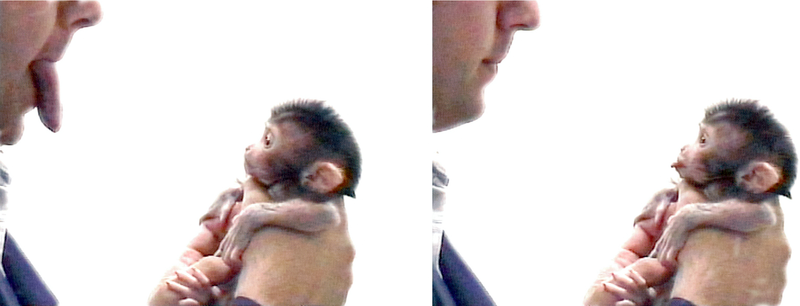
A mirror neuron is a neuron that is triggered to repeat the same behavior that is observed.  This phenomenon was first observed in the 1980s in macaque monkeys.  The researchers found that the same neurons fired when a monkey picked up a piece of food as when the monkey observed a researcher picking up a piece of food. 


This is significant for people because a large component of learning is based on observation.  Additionally, mirror neurons allow us to be empathetic and feel what others are feeling in a given situation.  Curiously, according to Dr. Goulston, this ability to related to others is frequently absent in autistic children, suggesting that mirror neuron dysfunction may contribute to autism.

The mirror neuron gap can be widened when we perceive ourselves differently from how others see us.  For example, we may view ourselves as confident while others see this as arrogance.  You may consider yourself to be sensitive and others perceive you as needy. 

The mirror neuron gap can be narrowed through effective communication leading ultimately to effective listening and thus connecting at a different level.

4 levels of talking and listening

You have probably been in a situation where you are speaking to someone and that person continues to working on the computer or check the phone.  This can be frustrating!  On the webinar Dr. Goulston discussed four types of talking and corresponding listening modes.
  1. Talking Over - Removed Listening - Perception of being condescending.
  2. Talking At - Reactive Listening - Lecturing.
  3. Talking To - Responsible Listening - Where most business communication occurs.
  4. Talking With - Receptive Listening - The level for deep communication.

Tips for getting through

Dr. Goulston concluded the webinar with these tips for connecting with others.
  1. Talk with to talk to someone, but never talk at or over.
  2. Ask fill in the blank questions, such as "You want to do this because ____?"
  3. Ask the impossibility question - "What is something that is impossible to achieve but would help you achieve your goal faster?" and use the answer to identify underlying opportunities. 
  4. Encourage the others to keep talking by responding with "Say more about ____", "Hmmmm," or "Really?" (not cynically).
  5. Focus on the ICU - topics that are Important, Critical, and Urgent.

 If you would like to learn more, I encourage to purchase the book at Amazon.com or your local bookstore.

If you found this post helpful, please comment below and share on Facebook.

Wednesday, May 21, 2014

Review of Vittle whiteboard recording app

Khan Academy is a website features thousands of instructional videos on a variety of education subjects including math, science, and history.  Developed by Sal Khan, the project started as YouTube-based tutorials for Sal's younger relatives living in a different state.  The videos feature whiteboard-style drawings using a Wacom tablet and voice-over by Sal.

There are a number of apps for the iPad and other tablets that record both drawing and narration.  One of my favorites is the app that I am reviewing in this post - Vittle. 

Vittle features

As you can see from the screen capture below, the layout of Vittle is lean with a panel of options across the top and paging at the bottom.  The screen capture displays the settings available with each option.


Import Keynote as PDF

In addition to the whiteboard functionality, you can also import PDF presentations from Keynote, DropBox, and e-mail.  Once imported you can annotate on top of the presentation.

Video capabilities

Vittle records each video as a scene, so you don't have to record an entire presentation in one take.  Once scenes have been recorded, you have the ability to delete unwanted scenes and reorder scenes.  When ready, you can save the video to the camera roll for additional editing in iMovie or for upload to the video platform of your choice. 

Some video recording apps require you to use their servers to house your videos.  I prefer to have mine saved to the camera roll for both control and the flexibility to do additional editing, and Vittle lets me do this.

Although the iPad is designed to draw with your fingers, I prefer using a stylus when using whiteboard and drawing apps.  Lots of stylus choices are out there, but I prefer the Griffin "Stylus for iPad and Capacitive Touchscreens" available for $14.99.

Video of Vittle Review

Below is the video I created using Vittle.


If you found this helpful, please comment below and share on Facebook.  If you download Vittle, let me know how it works for you.  What have been your experiences with whiteboard recording apps?

Tuesday, May 20, 2014

Greenscreen Effect Editing in Camtasia

Recently I posted about discovering the website Fiverr.com and how I found a narrator there to create an advertisement for www.PersonalChange.info.  You can also watch the video, which is at the top right of this blog.

Media used for video

The video Mike delivered to me featured him reading my script in front of a green screen.  Here is the original video as I received it:


The use of green screens and blue screen in Hollywood and in television weather studios has been around for several decades.  The advantage of filming against a solid color that is strikingly different from other colors in the video is that the background can be replaced with other video or still images.  With today's powerful computer graphics, movies like The Lord of the Rings and Star Wars (Episodes I, II, and III) make extensive use of this technology to create fantasy worlds.

As I noted in the blog post about Fiverr.com, this video was as much an evaluation of Fiverr as it was a promotional video.  I was satisfied enough with the result that I decided to include it on my blog as an "About this blog" video.

I decided to go with a simple background, a screenshot of www.PersonalChange.info.


Edited in Camtasia

Camtasia is a video screen capture program with fairly good editing capabilities.  One feature missing from Apple's iMovie but available in Camtasia is the ability to remove a color, that is, use the green screen technique.  The developer of Camtasia, TechSmith, offers a 30-day trial of the full software.  I use Camtasia for Mac, but the functionality is available in all versions.

Step 1 - Arrange the elements.

Place the background below the video image.

 Step 2 - Select Video FX and drag "Remove a Color" onto the video.


Step 3 - Select the color to remove and adjust.

  1. Use the color picker to select a color from the video to remove (typically, this will be your green screen color).
  2. Use the Tolerance slider to adjust how much beyond the selected color is displayed.  For me 0-20% is an effective range.


The results

The final video looks exactly like I expected.  Mike, the narrator, appears to be standing directly in front of the screen shot.   I also added a yellow banner to make the web address more visible.


If you found this helpful, please make a comment below and share on Facebook.

Thursday, May 15, 2014

Super 8 Camera App

In 1965 Eastman Kodak developed an 8mm film designed to be an improvement over previous types of films for home movie cameras.  Designated "Super 8" the format and corresponding camera became popular with film makers and is still used today for dramatic effects.

Searching for Sugar Man

Although I was already familiar with the Super 8 camera, I learned today about the Super 8 app.  The director Malik Bendjelloul used both the Super 8 camera and iPhone app to create the Academy-awarding winning documentary Searching for Sugar Man.  The movie is described as "Two South Africans set out to discover what happened to their unlikely musical hero, the mysterious 1970s rock 'n' roller, Rodriguez."

Bendjelloul ran out of money during the filming, and decided to use the Super 8 app, which replicated the look and feel of the camera, to finish the film.  At the 2013 Academy Awards, the film won for Best Feature Documentary.

Super 8 Movie

The Super 8 app was developed by Paramount Pictures as a way to promote the movie of the same name, Super 8.  Written and directed by J. J. Abrams, the movie"tells the story of a group of young teenagers who are filming their own Super 8 movie in a small town when a train derails, releasing a dangerous presence into their town" (from Wikipedia). 

Super 8 App

The Super 8 app costs (at the time of this writing) $0.99.  The app has several features including multiple lenses and a variety of sharing options.  My video review is below:


If you found this helpful, please comment below and share on Facebook.